Structured data explained
What is the schema for a breadcrumb list? A practical guide
Understand BreadcrumbList schema and fix 'breadcrumb structured data missing item' errors with JSON-LD guidance and testing steps.
Quick answer and what a breadcrumb list is
Short definition
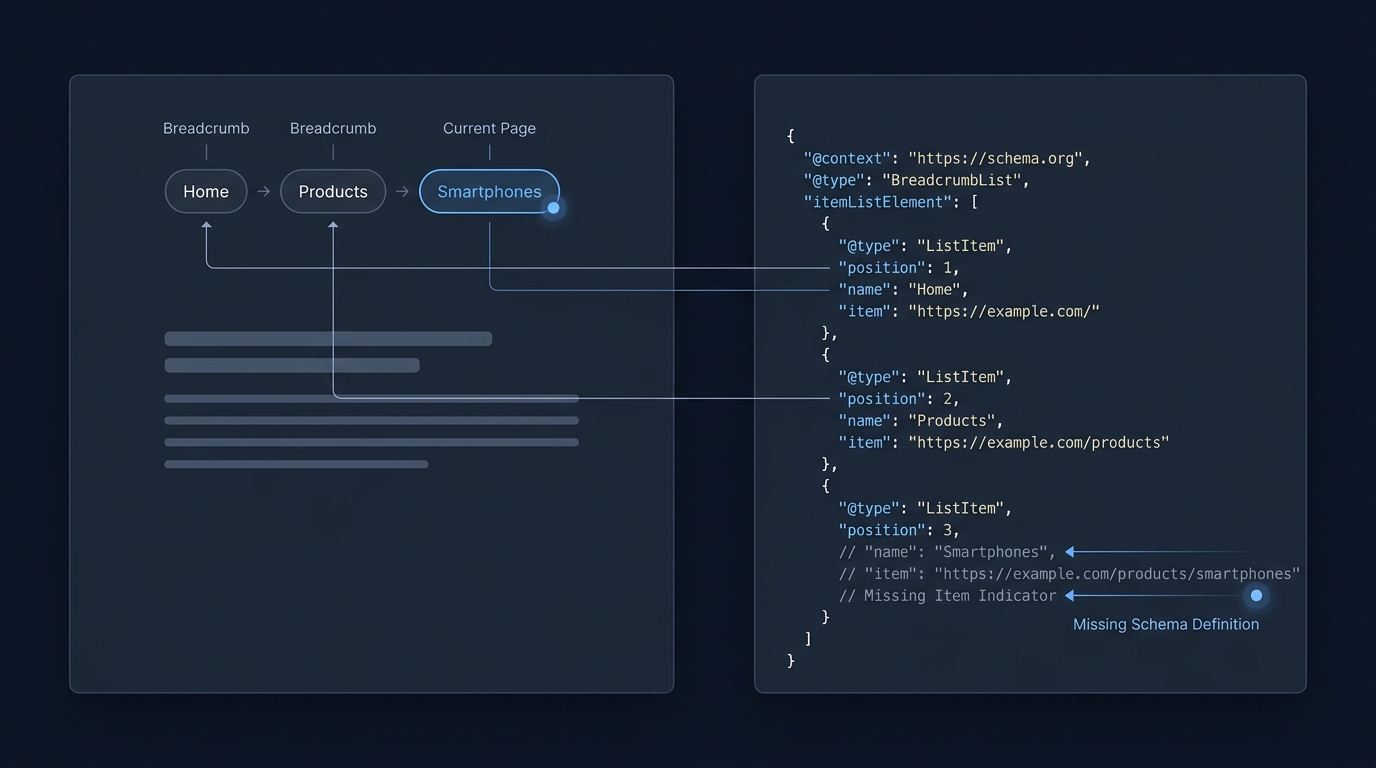
A BreadcrumbList is the Schema.org ItemList type used to describe a page's navigational trail, where each step is a ListItem that points to a linked page and includes a numeric position in the trail. For Schema.org's definition of BreadcrumbList, see the authoritative type page on Schema.org Schema.org BreadcrumbList.
In Search, Google looks for a BreadcrumbList implemented with itemListElement containing ListItem entries to determine eligibility for breadcrumb rich results, so missing the required item or position fields can make a page ineligible for those results Google Search Central breadcrumb documentation. Learn more about implementing breadcrumbs on our site: Breadcrumb markup guide.

Breadcrumb markup helps search engines understand site hierarchy and can make navigation clearer in search results; however, eligibility for a breadcrumb rich result depends on correct structure and required properties, not on whether the breadcrumb is visible to users.
When a ListItem omits the item field, which normally contains the URL for that breadcrumb step, or when the numeric position is missing or non-sequential, Google and validation tools typically flag the markup and the page may not be eligible for a rich result Google Search Central breadcrumb documentation.
What is the schema for a breadcrumb list and why does 'missing item' matter?
BreadcrumbList is a Schema.org ItemList whose itemListElement contains ListItem entries; each ListItem must include a numeric position and an item that identifies the breadcrumb step URL, and omitting either property commonly prevents eligibility for breadcrumb rich results.
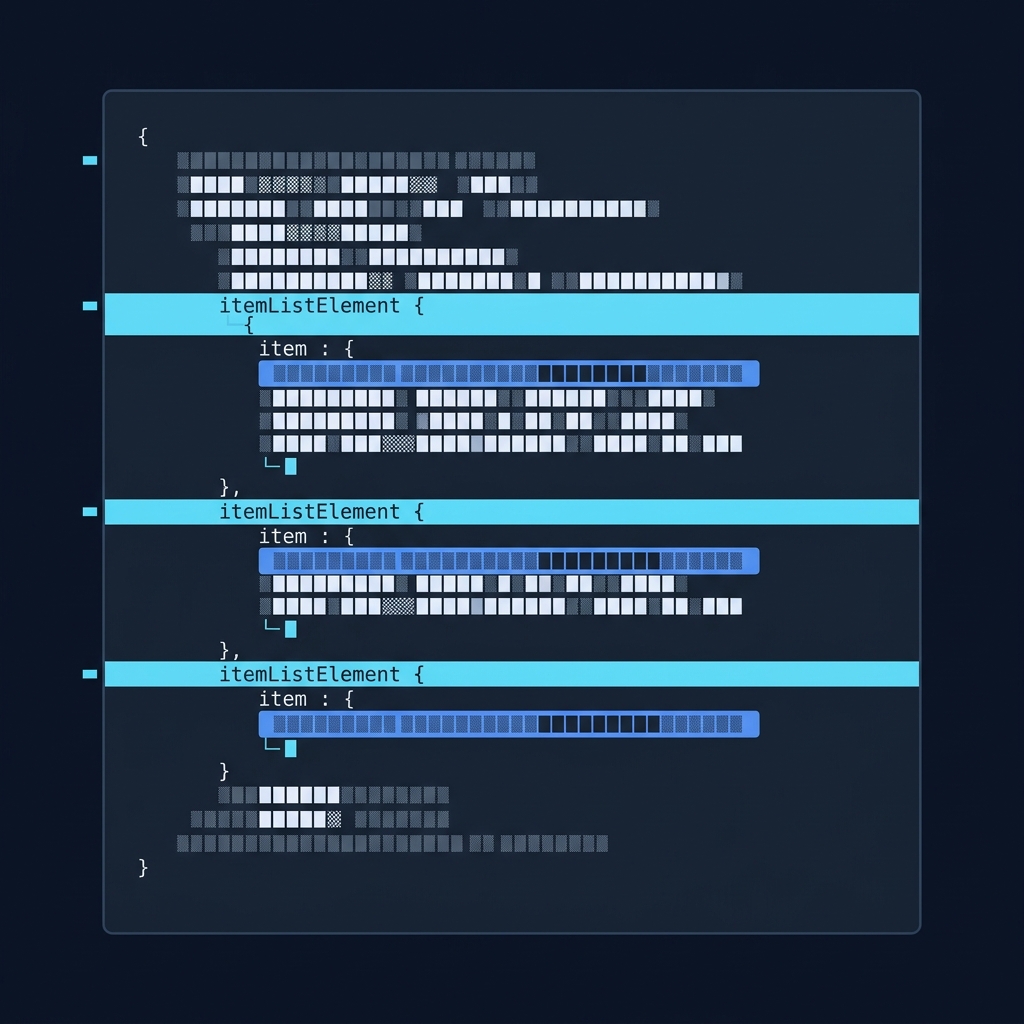
To diagnose a missing item, check the rendered HTML where JSON-LD appears and confirm each ListItem has both a position and an item with the URL or @id value. If you see serialized objects without an item URL, the implementation needs correction before rich result eligibility can be restored.
Required structure for BreadcrumbList in JSON-LD, breadcrumb structured data missing item
Core properties: itemListElement, ListItem, position, item
At its core, a valid BreadcrumbList implementation is an ItemList whose itemListElement array holds ListItem objects. Each ListItem should include a numeric position property and an item that provides a URL or a Thing with an @id and a human-readable name, matching Schema.org's expected fields Schema.org ListItem.
Google's guidance expects JSON-LD for structured data implementations and examples for BreadcrumbList follow the same pattern, so most implementers use JSON-LD script blocks to declare the list and its ListItem entries Google Search Central introduction to structured data.
Minimal valid JSON-LD example and common variants
A minimal, valid BreadcrumbList in JSON-LD should include the following elements described as fields: @context, @type set to BreadcrumbList, itemListElement as an array of ListItem entries, each ListItem with @type ListItem, position as an integer, and item as an object containing @id (or a plain URL) and name. The item value typically mirrors the canonical URL you intend for that page.
Data types matter: position must be an integer and positions should start at 1 and be sequential. The item value may be expressed as a string URL or as an object with @id and name when you want to include additional metadata. Keep the visible breadcrumb labels and the name property consistent with the site navigation to avoid confusing parsers and users.
If your templates generate the item field using a content management variable, verify the template outputs a full, canonical URL rather than a relative path or an unresolved token. Canonical URLs are the recommended form to reduce name and URL mismatches between the page and the breadcrumb entry.
How to test breadcrumbs and the decision points for eligibility
Which tools to use and what they check
Use Google's Rich Results Test to check whether a page is eligible for breadcrumb rich results; the tool parses JSON-LD and reports missing required properties that affect eligibility Rich Results Test. See our guide to Google rich results for related checks: Google rich results guide.
To confirm your markup follows Schema.org vocabulary and types, run the page through the Schema Markup Validator, which highlights structural conformance issues separate from Search eligibility rules Schema Markup Validator. For background on Schema.org concepts, review our foundations article: Schema.org foundations.
Interpreting tool output and next steps
When the Rich Results Test reports an error such as a missing item or missing position, treat that as a direct blocker to breadcrumb rich results and fix the JSON-LD before relying on Search Console reports for broader signals. The Rich Results Test output typically flags the exact ListItem entry and property that is missing or malformed.
If the Schema Markup Validator shows vocabulary conformance errors but the Rich Results Test still reports eligibility, prioritize fixing Schema.org conformance to reduce future errors and to ensure consistent behavior across tools and parsers.
Always test multiple representative pages and templates, not just a single URL. Template-level issues often affect whole classes of pages, so sampling category pages, product pages and deeper content pages gives a truer picture of implementation quality.
Common errors that cause 'breadcrumb structured data missing item' and how to fix them
Missing item (URL) or position
The most common validation blockers are a ListItem missing an item property, or a missing position property, both of which are required for breadcrumb rich results and for clear Schema.org conformance Google Search Central breadcrumb documentation.
Typical causes for a missing item include template code that omits the URL when rendering JSON-LD, conditional logic that only includes item for certain pages, or client-side rendering that never injects JSON-LD into the server-rendered HTML seen by crawlers.
If position values are missing or not integers, parsers will consider the list malformed. Positions should be explicit integers, sequential, and reflect the breadcrumb order starting at 1. Check server-side rendering and template loops to ensure the position counter is output correctly.
Run quick validations for breadcrumb item and position
Name/URL mismatches and canonical problems
Name and URL mismatches occur when the visible breadcrumb label differs from the name property or when the item URL does not match the page's canonical URL. These inconsistencies can confuse parsers and sometimes lead to warnings or reduced clarity in Search Console reports Google Search Central breadcrumb documentation.
To avoid that, ensure the item URL in each ListItem points to the canonical href you declare with the page's link rel canonical, and keep the name property consistent with the user-visible breadcrumb text. Where CMSs supply both a title and a permalink, prefer the canonical permalink for the item URL.
Other markup pitfalls
Serialization issues can leave placeholders or escaped characters in JSON-LD; validate the final HTML output to ensure the JSON-LD is well-formed JSON and that string values are not double-encoded. Parsers do not interpret template tokens, so unresolved tokens will be treated as invalid URLs.
Single-page apps that rely solely on client-side rendering may fail to expose JSON-LD to crawlers. Where possible, server-side render the JSON-LD or use a pre-rendering step so that the item and position fields are visible in the server response and detectable by validation tools.
Practical examples and quick checklist to fix missing item errors
Representative scenarios (static pages, CMS templates, SPA/JS-rendered sites)
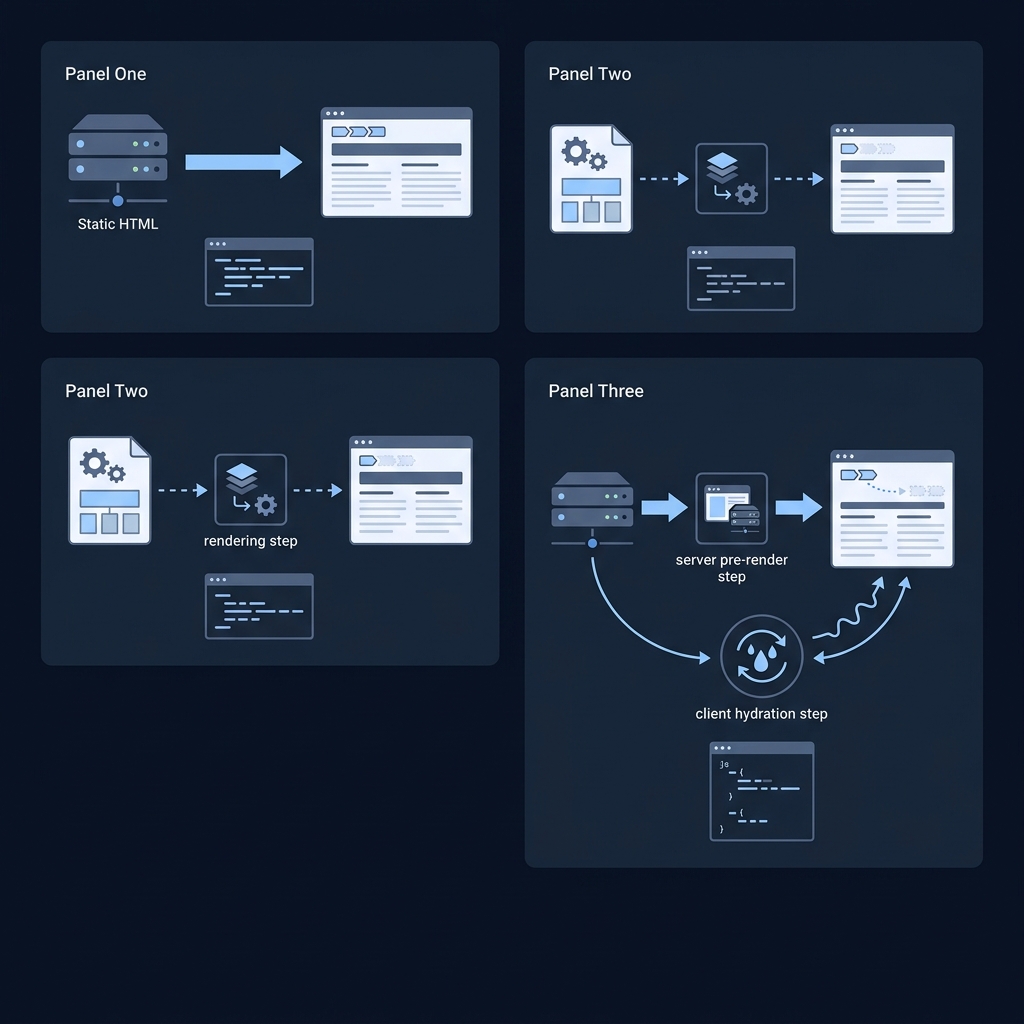
Static HTML sites usually have the simplest fix: ensure the static JSON-LD block includes each ListItem with position and item using full canonical URLs. Because the HTML is authored directly, a missing item is often the result of copy-paste errors or omission in the JSON-LD block.
For CMS-driven sites, template logic often assembles breadcrumb entries dynamically. If the CMS exposes both a slug and a full URL, confirm the template uses the full absolute canonical URL rather than a relative path or a slug-only field that may not resolve correctly in the JSON-LD output.
Single-page apps and client-side rendered pages are prone to missing JSON-LD in the server response. If JSON-LD is injected only after client-side hydration, run the Rich Results Test and view-source to confirm that the JSON-LD appears in the HTML that a crawler would retrieve.
A compact pre-launch checklist
Before launch, run a checklist across representative templates: Verify JSON-LD appears in the server HTML, confirm ListItem.position values are sequential integers starting at 1, ensure each ListItem.item contains a full canonical URL, and check that name properties match visible breadcrumb labels.
Validate those pages with both the Rich Results Test to confirm eligibility and with the Schema Markup Validator to confirm vocabulary conformance. Rerun these checks after any CMS or template change that touches navigation or URL generation logic Rich Results Test.
After deployment, periodically sample pages from different site sections and add checks to your release checklist so template or CMS updates do not accidentally remove required breadcrumb fields.
When to use breadcrumbs, maintenance tips and a short conclusion
Deciding when breadcrumbs add value
Use breadcrumbs when your site has a clear hierarchical structure, deep navigation paths, or large catalogs where relative position helps users and search engines understand where a page sits in the site. For flat sites or single-page experiences that lack hierarchy, breadcrumbs may add complexity without clear value.
Breadcrumbs are primarily a navigation aid; if users already have clear paths or if your primary navigation solves discovery, consider a minimal breadcrumb approach and focus on ensuring the markup that exists follows Schema.org and Search Central guidance Schema.org BreadcrumbList.
Ongoing maintenance and monitoring
Include breadcrumb generation in templates rather than one-off page edits, and add validation steps to your deployment process. Monitor Search Console and periodically run the Rich Results Test on representative pages to catch regressions after updates.
In summary, BreadcrumbList plus correctly populated ListItem.position and item (URL) are essential for eligibility and for clear semantic representation of site navigation. Use Schema.org documentation and Google Search Central as authoritative references when building and troubleshooting breadcrumb markup Google Search Central breadcrumb documentation.
Frequently asked questions
What causes a 'missing item' error in breadcrumb structured data?
A 'missing item' error occurs when a ListItem lacks the item field that should contain the breadcrumb step URL, or when the position property is absent or malformed.
Which tools should I use to validate breadcrumb markup?
Use Google's Rich Results Test to check eligibility and the Schema Markup Validator to confirm Schema.org vocabulary conformance.
Do breadcrumb names have to match visible labels?
Yes, keep the name property consistent with visible breadcrumb labels and ensure item URLs match the page canonical to avoid confusion.
Correctly implemented BreadcrumbList markup makes your site hierarchy clear to search engines and helps avoid validation blockers that prevent breadcrumb rich results. Regular testing and including breadcrumb generation in templates reduce the risk of regressions. When in doubt, rely on Schema.org type pages for structure and Google Search Central for eligibility guidance, and validate representative pages with the tools described here.
References
- https://developers.google.com/search/docs/appearance/structured-data/breadcrumb
- https://search.google.com/test/rich-results
- https://validator.schema.org/
- https://checkmyschema.com/learn/breadcrumb-markup
- https://checkmyschema.com/learn/google-rich-results
- https://checkmyschema.com/learn/schema-org-foundations