Structured data explained
Should organization schema be on all pages? A practical guide
organization schema markup belongs on pages that represent your business, like the homepage and about page. Learn when to implement and how to validate.
Short answer and what organization schema markup does
Direct answer: should it be on every page
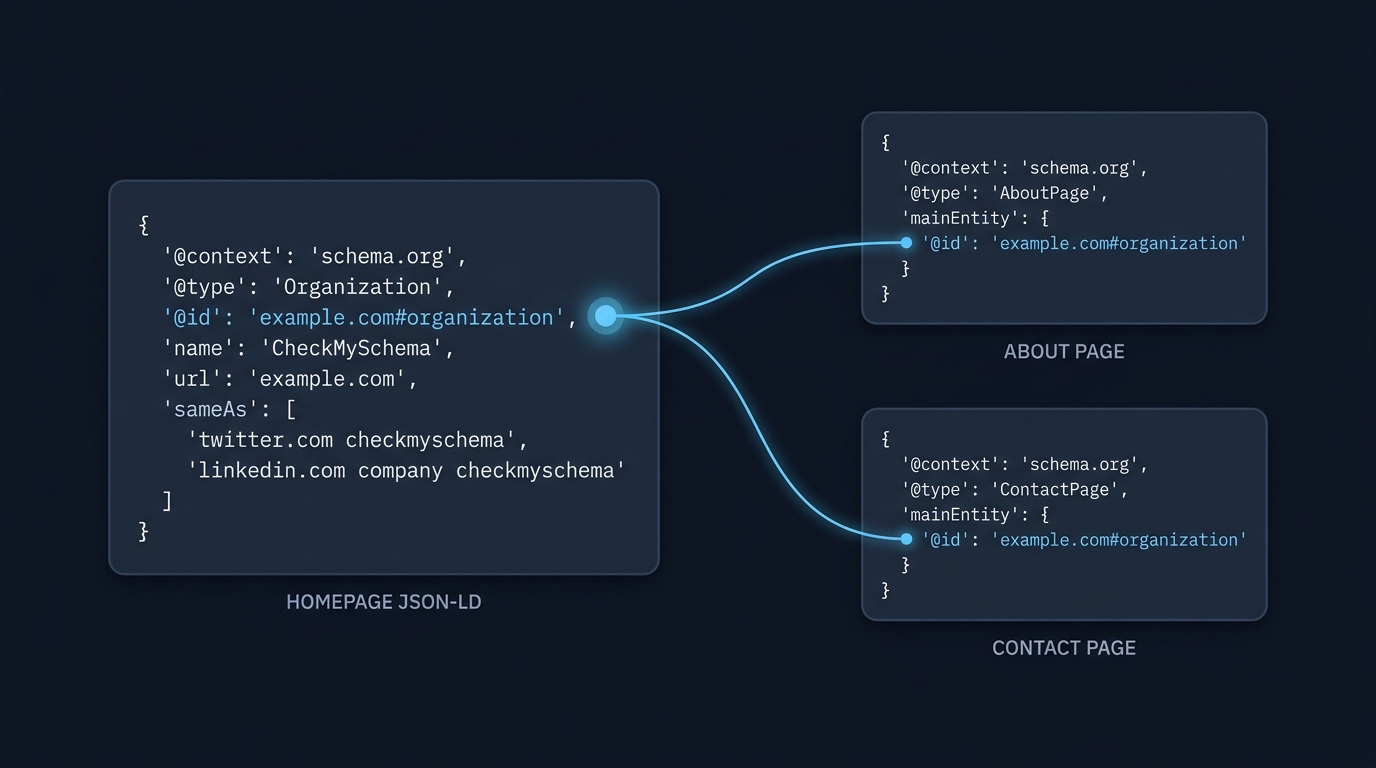
Short answer: organization schema markup does not need to be on every page; add it primarily to pages that represent the organization, like the homepage or the about page, and reference that same Organization entity from other pages when appropriate.
Should organization schema be on every page of my site?
No. Add Organization schema where the page's main content represents the business, such as the homepage or about page, and reference that single Organization entity from other pages when appropriate.
The purpose of Organization structured data is to declare the business or brand as an entity on a page and to enable eligible Search features such as Logo results, while keeping page markup truthful to the visible content. For guidance on page-level relevance and markup format, follow Google's structured data general guidelines and use JSON-LD as the implementation format Google Search Central general guidelines.
What Organization schema represents
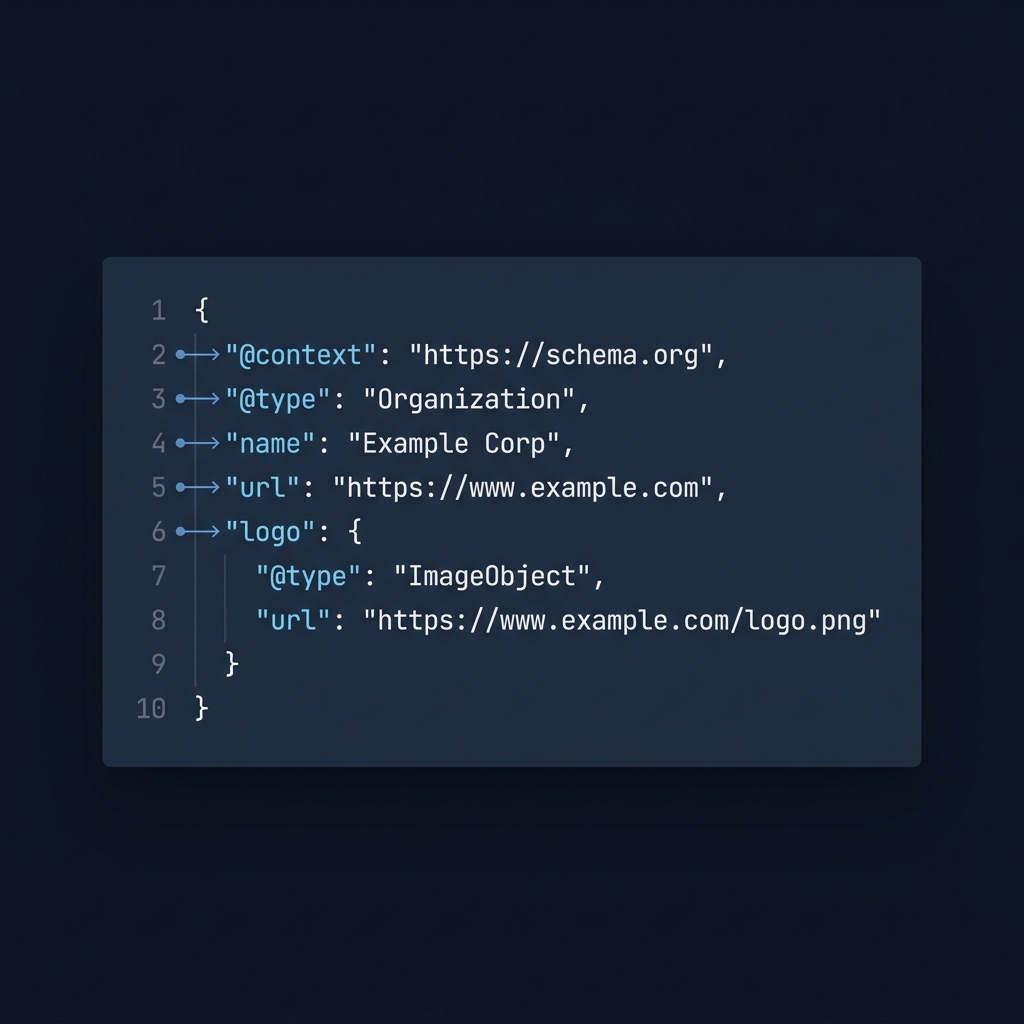
Organization JSON-LD represents the business or brand as a machine-readable entity, supplying properties such as name, url and logo that describe that entity. It is not a sitewide switch to force a specific appearance in Search; instead it provides a clear signal that search engines can use alongside other signals when they determine branding and logo presentation Google Search Central logo documentation.
When to add Organization schema: pages that should have it and why
Pages that commonly represent the organization
Common pages to host Organization JSON-LD are the homepage, the about page, press or corporate pages, and primary contact pages where the page content is explicitly about the business entity itself. These pages are the natural places where the structured data matches visible content and user intent, which aligns with Google's expectation that markup reflect the page's primary content Google Search Central general guidelines.
When a page has a different primary topic, such as a product detail, blog post, or help article, the page should prioritize page-type specific structured data (for example Product, Article or FAQ) and may omit Organization markup if that markup would not reflect the page's visible content.
quick page selection checklist for Organization JSON-LD
When to reference the organization from other pages
Instead of duplicating full Organization objects on every URL, assign a single canonical Organization entity an @id and reference that @id from other page-level structured data objects when you want them to point to the same business. This practice avoids conflicting definitions and makes it clear that multiple pages refer to the same organization, which is consistent with Google's guidance on entity reuse and linking Google Search Central logo documentation.
For example, a Product page can include a concise Product JSON-LD and add an organization reference using the @id value for the sitewide Organization object, rather than re-declaring the organization's full properties on every product URL.
How to implement Organization schema correctly in JSON-LD
Required and recommended properties for Logo results
Use JSON-LD 1.1 as the recommended serialization and include the properties Google documents as required for Logo structured data, notably the organization url and a logo property that points to a valid image URL. Google documents those required fields and notes that valid markup helps eligibility but does not guarantee a special result in Search Google Search Central logo documentation.
Keep the logo image accessible to Google (not blocked by robots.txt), sized and formatted according to the documented recommendations. Where Google specifies image requirements, follow those for the logo property so the Organization markup can be evaluated for the Logo feature.
Using JSON-LD 1.1 and linking entities with @id
Assign an @id to your Organization object, ideally using a URL under your control such as the canonical homepage URL, and reference that @id from other JSON-LD objects across the site. JSON-LD remains the preferred implementation format and is a stable W3C recommendation, so using JSON-LD 1.1 aligns with both Google and standards guidance W3C JSON-LD 1.1 recommendation and JSON-LD best practices. Learn more about JSON-LD graphs.
Keep Organization JSON-LD concise and focused on the entity. Typical properties to include are @context, @type set to Organization, name, url, logo, and the @id you will reuse. When referencing the Organization from other objects, use that @id rather than copying or altering the Organization definition on each page.
Validate and monitor: tests and Search Console checks
Page-level validation with Rich Results Test
Use the Rich Results Test to validate a page's structured data and to confirm which supported features Google recognizes for that page; the tool reports errors and warnings but does not guarantee display in Search results Google Search Central monitor and debug.
When you run the Rich Results Test, confirm that Organization JSON-LD parses without errors and that the logo and url properties appear as expected. The test helps catch syntactic problems and property omissions that would make the markup ineligible for feature-specific processing.
Sitewide monitoring in Search Console
After deploying Organization JSON-LD, monitor the structured data reports in Google Search Console to detect sitewide issues such as widespread errors, invalid references, or patterns of missing required properties. Search Console aggregates findings and can help prioritize fixes at scale Google Search Central monitor and debug.
Regularly review Search Console reports after changes to templates or CMS updates, and use Search Console data alongside page-level Rich Results Test checks to maintain accurate Organization markup across the site.
Common mistakes, pitfalls and real-world scenarios
Typical implementation errors
A frequent mistake is adding Organization markup to pages where the page's main content is not the organization itself, which can misrepresent the page and create ambiguous signals. Follow the guideline that structured data should reflect the page content rather than being applied uniformly without regard to context Google Search Central intro to structured data.
Another common error is missing required Logo properties or providing a logo URL that is inaccessible to crawlers. Such omissions can render the logo ineligible for the Logo feature and generate errors in validation tools.
Decision scenarios with examples
Scenario: a single small business with a clear homepage. Do: place Organization JSON-LD on the homepage and the about page, include logo and url fields, assign an @id, and reference that @id where needed. This keeps the entity definition central and avoids conflicting markup.
Scenario: a multi-brand site that operates several distinct brands. Do not force a single Organization object onto every brand page; instead, create distinct Organization objects where each brand page truly represents that brand, and avoid overlapping or contradictory entity definitions that could confuse signals.
Scenario: a publisher or large site with many authors and sections. Do: prioritize page-level types like Article and use an explicit Organization or Publisher object only on pages where it is the primary entity, such as the sitewide about or imprint, and reference the publisher consistently from article objects where appropriate.
When conflicting Organization definitions exist across templates, consolidate by choosing a single canonical Organization object and update templates to reference its @id; this reduces the risk of duplicate or inconsistent identity signals. For more on connected entity conflicts, see connected entity conflicts.
Checklist and next steps for implementation
Quick checklist
Decide which pages should host Organization JSON-LD: typically the homepage, about and press pages.
Include required organization properties for logo use and a canonical url, assign a stable @id, validate pages with the Rich Results Test, and monitor Search Console for sitewide findings Google Search Central monitor and debug.
Ongoing monitoring and maintenance
Check structured data reports after any template or asset changes, confirm the logo file remains accessible, and run periodic Rich Results Test checks on representative pages. Remember that correct markup improves eligibility but does not guarantee that Google will show the logo or site name as you expect Google Search Central site names documentation.
Maintain a release checklist that includes validation of Organization JSON-LD when you update site templates or deploy new site sections. Over time, audit for orphaned or duplicated Organization objects and resolve inconsistencies by centralizing the entity definition and using @id references.


Frequently asked questions
Do I need Organization schema on every page?
No. Add Organization schema where the page is primarily about the business, such as the homepage or about page, and reference the entity elsewhere with @id when needed.
Will Organization JSON-LD guarantee my logo appears in Google Search?
No. Correct Organization JSON-LD with logo and url improves eligibility for logo features but does not guarantee display; Google may use other signals.
What tools should I use to check Organization markup?
Use the Rich Results Test for page-level validation and Google Search Console structured data reports for sitewide monitoring.
Correct Organization JSON-LD improves the clarity of your site identity signals and supports eligibility for features such as the Logo result, but it is not a guarantee of how Google will display your brand. Prioritize accuracy, reuse a canonical @id, validate individual pages, and monitor Search Console for ongoing health. Treat Organization markup as part of a broader site identity strategy: implement it where the page content matches the entity, keep it consistent, and use available tools to detect and fix issues quickly.
References
- https://developers.google.com/search/docs/appearance/structured-data/sd-policies
- https://developers.google.com/search/docs/appearance/structured-data/organization
- https://www.w3.org/TR/json-ld11/
- https://support.google.com/webmasters/answer/7552505
- https://developers.google.com/search/docs/appearance/structured-data/intro-structured-data
- https://developers.google.com/search/docs/appearance/site-names
- https://schema.org/Organization
- https://w3c.github.io/json-ld-bp/
- https://checkmyschema.com/learn/jsonld-graphs
- https://checkmyschema.com/learn/google-rich-results
- https://checkmyschema.com/learn/connected-entity-conflicts
- https://checkmyschema.com/