Structured data explained
Content guidelines for Google Image Search
A clear answer to what Google expects from images that appear in Google Image Search, including SafeSearch, eligibility, display controls, and practical do/don’t guidance.
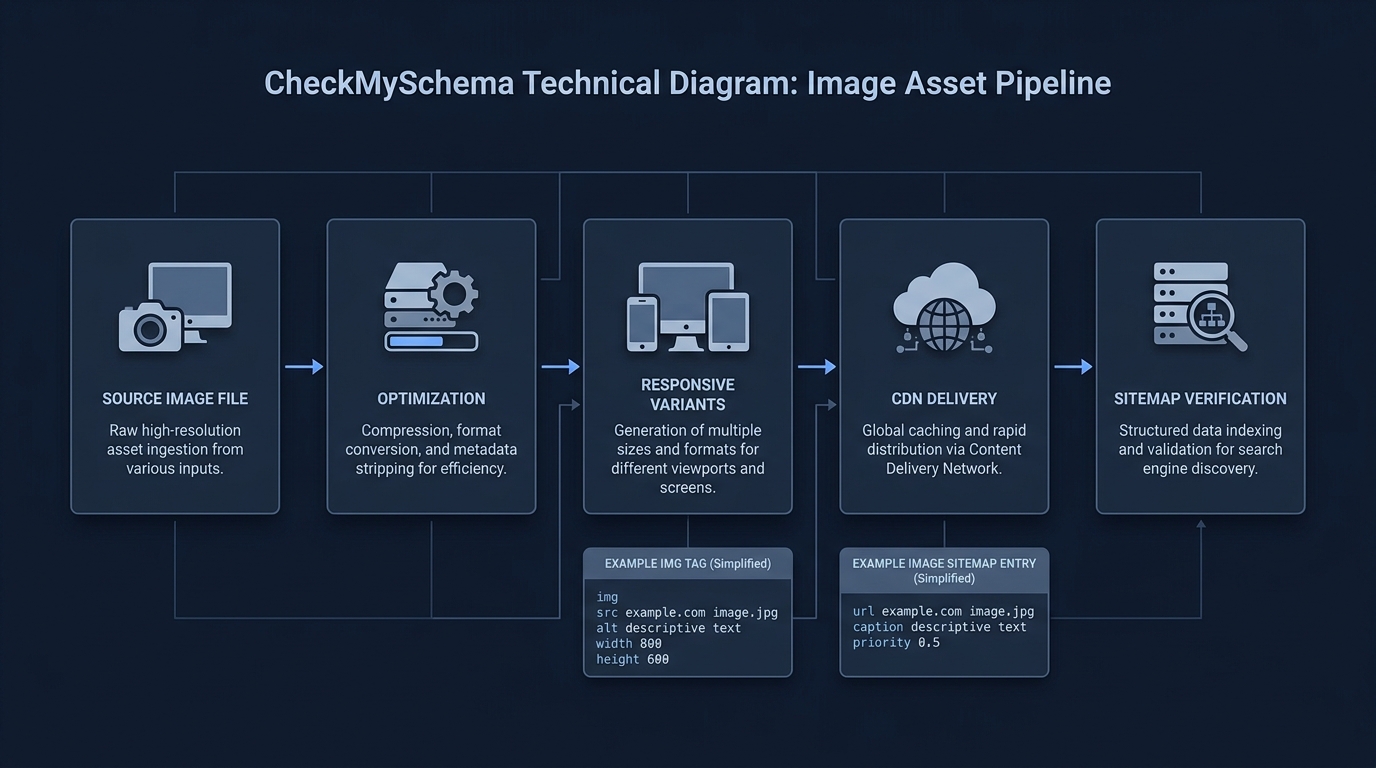
Google Image Search expects images to be safe for users, accurately described on their landing pages, and published in a way Google can crawl and index. In practice, follow Google’s Image SEO best practices: use HTML <img src> (not CSS backgrounds), supported file formats, descriptive alt text and filenames, relevant on-page context, structured data where applicable, and an image sitemap; label content appropriately for SafeSearch; and use Google’s documented controls if you want to limit how images appear in Google Images. See Google’s guidance throughout this article for details and examples (Image SEO best practices).
What Google expects from images and their pages
- Embed images with standard HTML
<img src>. Google can find images insrcof<img>; it does not index CSS background images (Image SEO best practices). - Use supported formats: BMP, GIF, JPEG, PNG, WebP, SVG, and AVIF. Data URIs are also supported but can bloat pages; use judiciously (Image SEO best practices).
- Provide descriptive alt text and filenames. Place images near relevant text and avoid keyword stuffing in
alt(Image SEO best practices). - Help Google discover images with an image sitemap, including images hosted on a CDN; consider verifying the CDN domain in Search Console to receive crawl error reports (Image SEO best practices).
- Use responsive images correctly. Provide a fallback
srceven if you usesrcsetor<picture>so all crawlers and browsers can fetch an image (Image SEO best practices). - Prioritize quality and performance. Sharp, high-quality images improve user appeal, but images are often the largest bytes on a page, so optimize for speed (Image SEO best practices).
- Keep image URLs consistent across your site to help with crawl efficiency and caching (Image SEO best practices).
Sensitive or explicit content and SafeSearch
SafeSearch is a user setting that can show, blur, or block explicit images, videos, and websites in Search results. Publishers should make sure Google understands the nature of their site and label pages for SafeSearch where appropriate (Image SEO best practices).

Control what appears in Google Images
- Opt out of inline linking. You can prevent the full-sized image from appearing directly in the Google Images results page by checking the HTTP referrer for Google and responding with 200 or 204 with no content. Google will still show a crawl-time thumbnail. This is not considered image cloaking and won’t trigger a manual action (Image SEO best practices).
- Prevent an image from appearing at all. Google documents that you can block images from appearing in search results entirely; use indexing controls carefully and test changes (Image SEO best practices). If you need a refresher on page-level directives, see our primer on noindex and nofollow.

Metadata that improves selection and display
- Specify your preferred preview image. You can indicate it via schema.org (for example,
primaryImageOfPageor the page’s main entityimage) or withog:image. Choose a representative, high-resolution image; avoid generic logos, heavy text overlays, and extreme aspect ratios (Image SEO best practices). - Use structured data when eligible. For certain content types, structured data can enable rich results and prominent badges in Google Images. Follow Google’s structured data guidelines for each type and ensure the
imagefield is present where required (Image SEO best practices). For implementation help, see our guide to validate schema markup. - Write clear titles and meta descriptions. Google may use them when generating snippets that accompany images in results (Image SEO best practices).
Pitfalls to avoid
- Publishing images only as CSS backgrounds. Google doesn’t index CSS images; always include an
<img src>(Image SEO best practices). - Keyword stuffing in alt text. Provide concise, useful descriptions instead of lists of keywords (Image SEO best practices).
- Missing a fallback
srcwithsrcsetor<picture>. Always include a standardsrcto ensure discoverability (Image SEO best practices). - Blocking image URLs or CDN assets unintentionally. Ensure Google can crawl your image URLs, and verify CDN domains in Search Console if used (Image SEO best practices).
Image content and eligibility checklist for Google Images
FAQs
Does Google index CSS background images?
No. Google states it doesn’t index CSS images; use standard HTML <img src> so images can be discovered and processed (Image SEO best practices).
Which image formats does Google Search support?
BMP, GIF, JPEG, PNG, WebP, SVG, and AVIF are supported when referenced in an <img src>. Data URIs are also allowed but can increase page size, so use with care (Image SEO best practices).
