Structured data explained
Noindex vs nofollow: a clear guide for developers
Understand the difference between noindex and nofollow, how to implement each via meta tags or headers, when to use them, and how to verify they work.
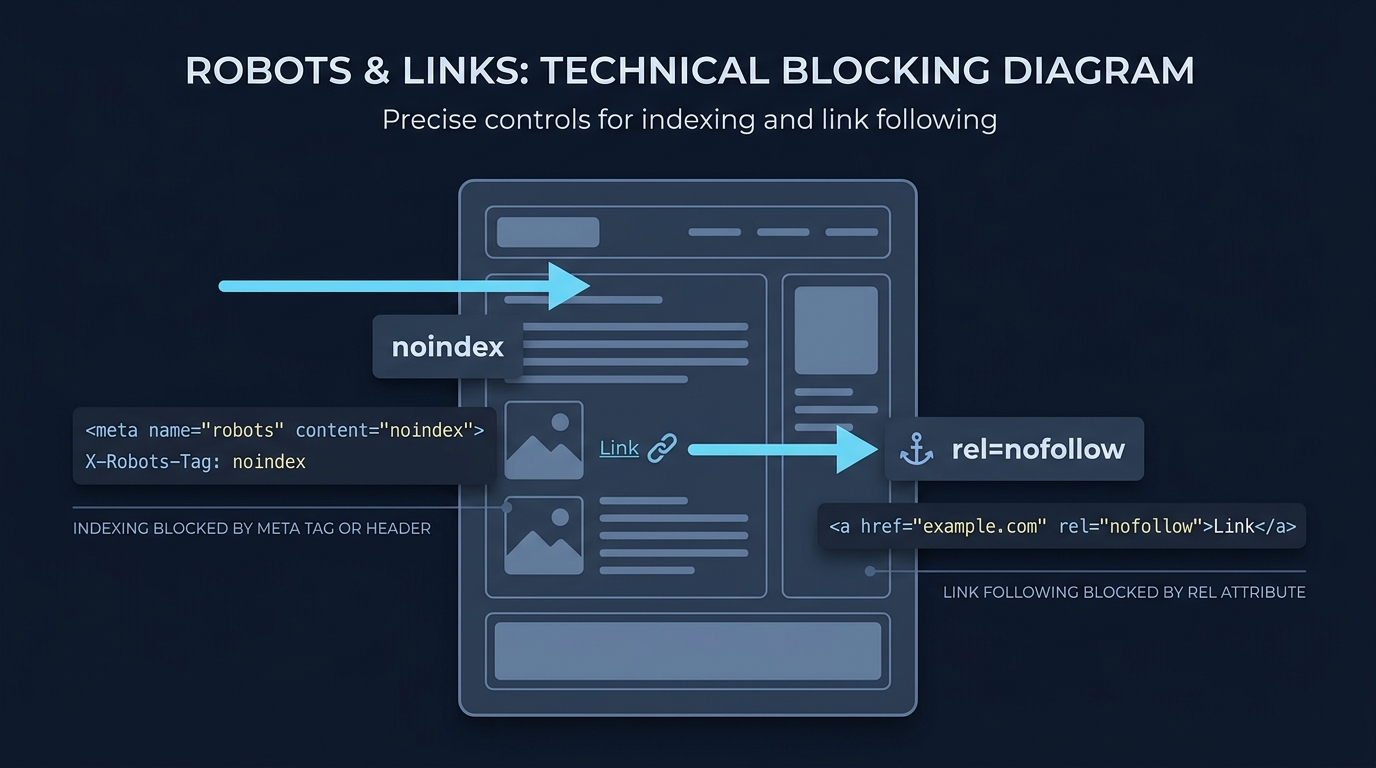
Noindex removes a page from search results when crawlers see the directive; nofollow tells crawlers not to follow links on a page or a specific link. They control different things: visibility in search vs link following and discovery (https://developers.google.com/search/docs/crawling-indexing/block-indexing, https://help.siteimprove.com/support/solutions/articles/80000448137-seo-noindex-vs-nofollow).
What each directive does
Noindex
Noindex tells supported search engines not to include a page in their indexes. When Googlebot crawls a page and finds noindex (via meta or header), it drops the page from Google Search results (https://developers.google.com/search/docs/crawling-indexing/block-indexing).
Two equivalent ways to implement:
- Meta tag in the head:
<meta name="robots" content="noindex"> - HTTP header for any resource (HTML, PDFs, images, video):
X-Robots-Tag: noindex
Nofollow
Nofollow can be applied at link level or page level. It asks crawlers not to follow the affected links or pass value through them. Google treats nofollow as a hint, not a strict directive (https://help.siteimprove.com/support/solutions/articles/80000448137-seo-noindex-vs-nofollow).
- Link-level:
<a href="https://example.com" rel="nofollow">Example</a> - Page-level meta:
<meta name="robots" content="nofollow">

Implementation examples
Keep the page out of search, allow link discovery
Add to the head: <meta name="robots" content="noindex, follow">. This removes the page from search while still allowing crawlers to process its links.
Use an HTTP header for non-HTML files or server-level control
Return in the response: X-Robots-Tag: noindex. This provides the same indexing control as the meta tag and works for non-HTML resources (https://developers.google.com/search/docs/crawling-indexing/block-indexing).
Apply nofollow to a single link
Mark just the link you don’t want crawled: <a href="https://example.com" rel="nofollow">Vendor site</a> (https://help.siteimprove.com/support/solutions/articles/80000448137-seo-noindex-vs-nofollow).
When to use noindex, nofollow, or both
- Use noindex for pages that shouldn’t appear in search: login, internal search results, thank-you pages, thin or duplicate content, or temporary content. It’s fine to combine with
followif you still want link discovery from the page (https://developers.google.com/search/docs/crawling-indexing/block-indexing). - Use nofollow on links that are untrusted or paid, or where you don’t want to pass link value. For a whole page’s outbound links, use a page-level meta nofollow (https://help.siteimprove.com/support/solutions/articles/80000448137-seo-noindex-vs-nofollow).
- Use both noindex, nofollow when the page must stay out of search and you also don’t want its links followed (for example, certain promotional or temporary pages).
Common mistakes to avoid
- Relying on robots.txt to deindex: Disallow prevents crawling, not indexing. Google doesn’t support specifying noindex in robots.txt, and if a page is disallowed, Googlebot can’t see your meta/header noindex (https://developers.google.com/search/docs/crawling-indexing/block-indexing; general differences also discussed at https://www.drlinkcheck.com/blog/noindex-nofollow-disallow).
- Expecting nofollow to remove a page from results: nofollow controls link following, not indexing (https://help.siteimprove.com/support/solutions/articles/80000448137-seo-noindex-vs-nofollow).
- Forgetting that re-crawl is required: Google must recrawl a URL to see your new noindex. Timing varies; you can request recrawl in Search Console’s URL Inspection tool (https://developers.google.com/search/docs/crawling-indexing/block-indexing).
Implement and verify robots directives
How to verify your setup
First, check the live response. For meta tags, use View Source. For headers, use your browser’s Network panel or a command like curl -I https://example.com/page. Then confirm with Search Console’s URL Inspection tool, which shows the HTML Googlebot received and whether a noindex rule was extracted. If a page still appears in search, it may not have been crawled since you added noindex, or it may be blocked by robots.txt; unblock it so Googlebot can see the directive (https://developers.google.com/search/docs/crawling-indexing/block-indexing).
FAQ
Does nofollow stop a page from being indexed?
No. Nofollow affects link following, not whether the page itself is indexed. Use noindex to keep a page out of search results (https://help.siteimprove.com/support/solutions/articles/80000448137-seo-noindex-vs-nofollow).
Can I use noindex on PDFs or images?
Yes. Send X-Robots-Tag: noindex in the HTTP response header for non-HTML resources (https://developers.google.com/search/docs/crawling-indexing/block-indexing).
Related reading on structured data and measurement: How to validate schema markup: a practical checklist and Why is schema markup important for SEO?

Related guides
Related guide from My AI Search Report
To distinguish search directives from a specific AI search crawler, see What is OAI-SearchBot?.