Structured data explained
How do I create a JSON file?
A concise, validator-focused guide to creating JSON files by hand or in code, plus a worked JSON Schema example and practical validation tips.
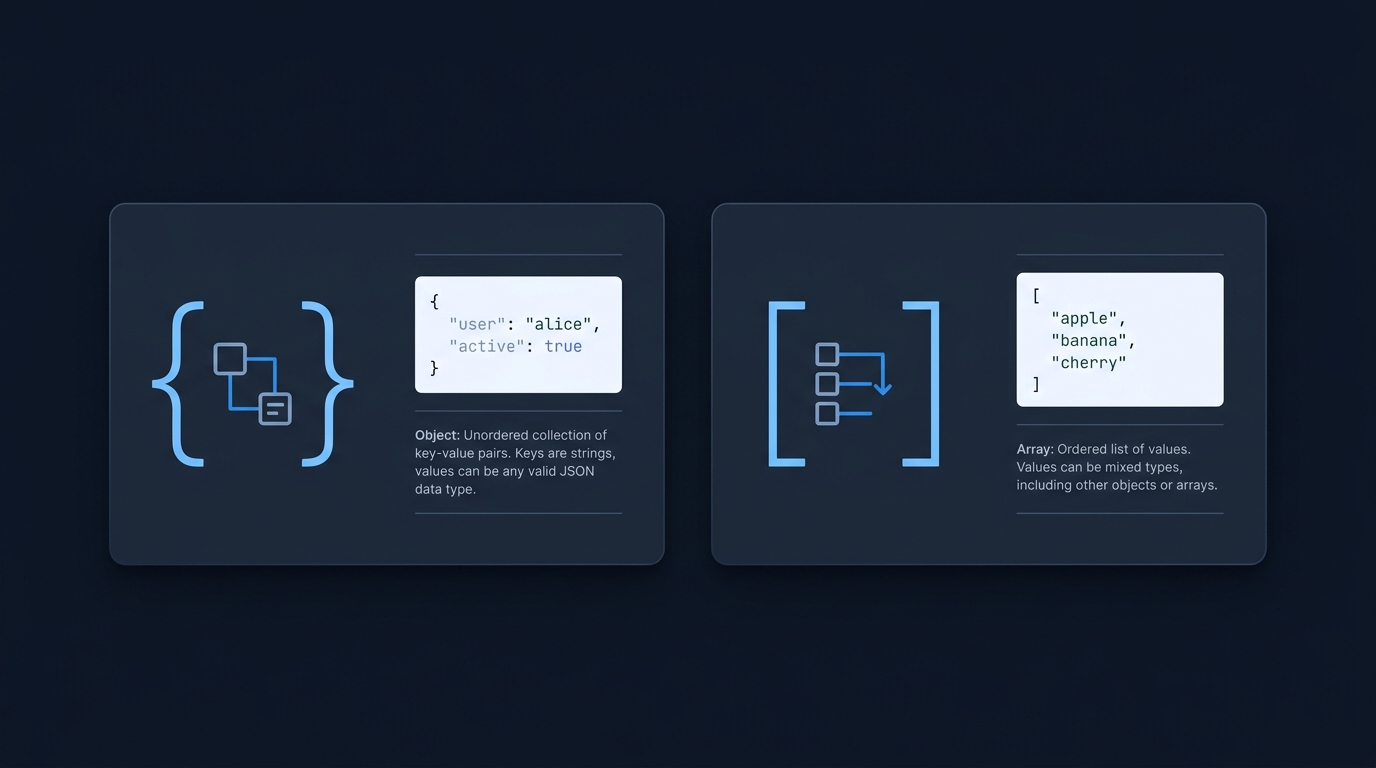
Write valid JSON text and save it as a .json file (UTF-8). If you are using a JSON Schema validator, create your instance JSON, write or reference the schema, then run your validator to confirm the instance meets the schema’s assertions. JSON’s grammar (values, objects, arrays, strings, and numbers) is defined in RFC 8259, and JSON files commonly use the application/json media type and the .json extension RFC 8259 MDN: Working with JSON.
Essential rules (so your file parses and validates)
- JSON values are objects, arrays, strings, numbers, true, false or null. Strings use double quotes; numbers do not allow Infinity or NaN. Arrays and objects are comma-separated without a trailing comma RFC 8259 MDN: Working with JSON.
- No comments in standard JSON. Editors may offer a JSON-with-comments mode for their own settings, but that is not standard JSON MDN: Working with JSON VS Code: Editing JSON.
- Encoding: for data exchanged between systems, RFC 8259 requires UTF-8. Saving your .json file as UTF-8 avoids interoperability issues and BOM surprises RFC 8259.

Create a JSON file by hand (quickest path)
- Open a plain-text editor.
- Paste valid JSON.
- Save as something.json using UTF-8 encoding.
Confirm that the saved name really ends in .json rather than .json.txt. Keep it as plain text, not a rich-text document. The filename alone does not make invalid content into JSON.
Minimal valid object
{
  "name": "example",
  "enabled": true,
  "count": 3
}
Minimal valid array
["one", "two", "three"]
More on what JSON can contain: see our explainer on types in validators What are the JSON Schema types? and MDN’s syntax notes MDN: Working with JSON.
Create a JSON file programmatically
The typical workflow is build native data, serialize to JSON text, then write the file. In a new, empty working folder, using Node.js CommonJS (for example a .cjs script):
const fs = require("node:fs");
const product = {
  id: "sku-123",
  name: "Widget",
  price: 9.99,
  inStock: true
};
const json = JSON.stringify(product, null, 2); // serialize with pretty-print
fs.writeFileSync("product.json", json, { encoding: "utf8" });
This synchronous example writes product.json in the current working directory and overwrites that name if it already exists. Use an empty test folder and a deliberate destination for real data.
JSON.stringify above serializes native data; JSON.parse reads JSON text back. This is the standard way to convert between objects and JSON text MDN: Working with JSON.
Validate it with a JSON Schema
Validators check an instance JSON against a JSON Schema. The example below explicitly declares the 2020-12 dialect. Choose a validator configured to support that dialect rather than assuming every validator uses the same default JSON Schema Validation (2020-12).
A small schema (schema.json)
{
  "$schema": "https://json-schema.org/draft/2020-12/schema",
  "$id": "https://example.com/product.schema.json",
  "title": "Product",
  "type": "object",
  "required": ["id", "name", "price"],
  "properties": {
    "id": { "type": "string", "minLength": 1 },
    "name": { "type": "string", "minLength": 1 },
    "price": { "type": "number", "minimum": 0 },
    "tags": { "type": "array", "items": { "type": "string" } },
    "inStock": { "type": "boolean" }
  }
}
- type, required, minimum, minLength and array item typing are defined in the validation vocabulary JSON Schema Validation (2020-12).
- "integer" in JSON Schema matches numbers with a zero fractional part; JSON itself has a single number type JSON Schema Validation (2020-12) RFC 8259.
Valid instance (product.json)
{
  "id": "sku-123",
  "name": "Widget",
  "price": 9.99,
  "tags": ["sale", "widget"],
  "inStock": true
}
Invalid against the schema (intentional)
Expected failure: missing required property "price" (the validator should report a required violation).
{
  "id": "sku-123",
  "name": "Widget"
}
Each schema object is evaluated independently at the applicable instance locations; the instance is valid only if all asserted constraints pass JSON Schema Validation (2020-12). To learn how to author schemas, see our broader guide How do I write a JSON Schema?.
Editor and validator tips
- VS Code can validate JSON and suggest values when a schema is associated. You can map files to schemas in settings. The inline "$schema" property is supported by VS Code as an editor hint, but it is editor-specific and not part of the JSON Schema specification; don’t add it if downstream systems expect a plain instance VS Code: Editing JSON.
- VS Code also has a JSON with Comments (jsonc) mode for its own settings that permits comments and trailing commas; these are not standard JSON VS Code: Editing JSON MDN: Working with JSON.
- When exchanging files between systems, encode as UTF-8; RFC 8259 requires UTF-8 for networked JSON and advises avoiding a byte order mark (BOM) RFC 8259.
Create and validate a JSON file (quick checklist)
FAQ
Can I put comments in a JSON file?
No. Standard JSON does not allow comments. Some editors provide a non-standard jsonc mode for their own settings files only MDN: Working with JSON VS Code: Editing JSON.
What encoding should I use?
Use UTF-8. RFC 8259 requires UTF-8 for JSON exchanged between systems; saving as UTF-8 avoids interoperability problems RFC 8259.
