Structured data explained
Why is schema markup important for SEO? A practical guide
schema markup explained with practical steps: implement JSON-LD, test with Rich Results Test, and monitor results in Search Console.
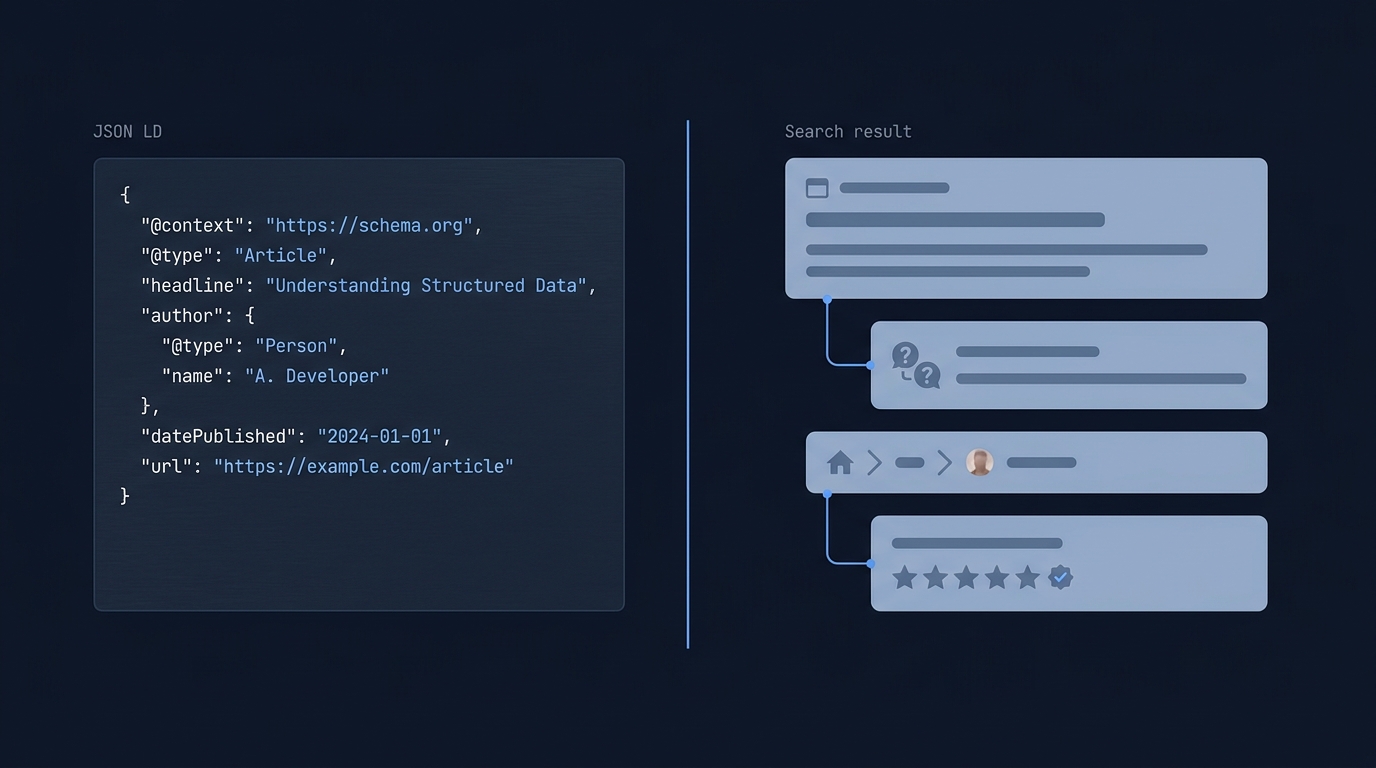
What schema markup is and why it matters for SEO
Definition: structured data and schema markup
Schema markup, often described as structured data, is a standardized way to label content on a page so search engines can better interpret what the page is about; schema markup adds machine-readable context that complements on-page text and meta tags and helps Search understand content more reliably Google Search Central structured data overview
Why should I add schema markup to my site?
Schema markup helps search engines understand page content and makes pages eligible for rich result types that can improve search presentation and click-through rates, but it does not guarantee higher rankings.
In plain English, think of schema markup as short, explicit labels for the most important facts on a page: product name, price, author, event date, or the steps in a how-to. Those labels do not replace visible content but they supply a predictable structure that automated systems can parse and act on without guessing. The primary practical benefit is improved clarity and eligibility for enhanced presentation in search results, commonly called rich results Google Search Gallery
How search engines use schema markup to interpret content
Search engines use structured data to understand entities, relationships and the role of a page in a larger content set. Structured data helps a crawler or indexer map a page to specific types in the schema vocabulary, which in turn makes pages eligible for special presentation formats in search results, though display is not guaranteed and depends on meeting feature-specific conditions Google Search Central structured data overview
There are three common syntaxes for adding structured data: JSON-LD, Microdata and RDFa. For most sites Google recommends JSON-LD because it is easier to author and maintain without altering the HTML document structure, while Microdata or RDFa may still be used in systems where embedding properties inline is the established workflow Structured Data SEO 2026: Rich Results Guide
Underpinning modern JSON-based implementations is the W3C JSON-LD 1.1 Recommendation, which defines how to express linked data in JSON. Using JSON-LD aligns your markup with that standard and reduces syntax errors when done correctly W3C JSON-LD 1.1 Recommendation JSON-LD graphs guide

How to implement schema markup: a practical step-by-step framework
Choose a format and the right vocabulary
1. Start by choosing the correct vocabulary type for the page, for example Article, Product, Event, FAQ, HowTo, or Recipe. Refer to the Search Gallery to confirm the rich result types that map to your content and the properties they require Google Search Gallery

2. Prefer JSON-LD in new work unless you have a reason to use Microdata or RDFa. JSON-LD is supported by Google and follows the W3C standard, which keeps your markup decoupled from the page HTML and easier to maintain Structured data general guidelines
Build JSON-LD snippets and where to place them
3. Author a JSON-LD snippet that contains the required properties for the feature you want. Place the snippet in a script tag with type="application/ld+json" either in the head or the body; Google accepts either location so long as the markup is present at crawl time W3C JSON-LD 1.1 Recommendation
4. Keep markup aligned with visible content: required properties must reflect information users can see on the page. Do not mark up content that is misleading, hidden or unrelated to the user experience Structured data general guidelines
Validate, deploy and monitor
5. Before you deploy, validate each snippet with the Rich Results Test to catch syntax errors and missing required properties; the test reports which result types a page is eligible for and flags structured-data issues Test your structured data with the Rich Results Test Rich Results Test tool
6. After deployment, monitor the site’s rich results coverage and issues using the rich results status reports in Search Console, which show coverage, errors and whether Google has detected structured data at scale Rich results status reports in Search Console learn more on CheckMySchema
How to decide which schema types to add to your site
Match schema types to user intent and page purpose
Map the page’s user intent to schema types before you start. Informational pages map well to Article, HowTo or FAQ; transactional pages usually map to Product or Offer; event or local pages map to Event or LocalBusiness. Choosing the right type improves the chance that markup supports an appropriate rich result Google Search Gallery
Consult the Search Gallery for eligibility and required properties
Each rich result type has a documented set of required and recommended properties in the Search Gallery. Confirm those property names and cardinality before authoring your snippets, because omitting required properties can block eligibility even if the rest of the markup is valid Google Search Gallery
Prioritization: impact, effort and policy risk
Prioritize schema types using three practical axes: potential SERP appearance and click opportunity, engineering effort to implement and maintain, and policy risk where incorrect markup could remove eligibility or trigger manual actions. Use Search Console Performance data to estimate impressions and CTR for pages that already show structured data to inform choices Rich results status reports in Search Console
Simple, high-impact candidates are often Product pages for commerce sites and FAQ or HowTo pages for content sites. These types tend to have clear required properties and limited template variation, making them easier to maintain over time

Simple, high-impact candidates are often Product pages for commerce sites and FAQ or HowTo pages for content sites. These types tend to have clear required properties and limited template variation, making them easier to maintain over time Structured data general guidelines product snippet guide
Common implementation mistakes and how to avoid them
Invalid or incomplete markup and syntax errors
One of the most frequent problems is malformed JSON or missing required properties. Use a test-first workflow where developers author minimal snippets and run them through the Rich Results Test to surface syntax and property errors early Test your structured data with the Rich Results Test
The Rich Results Test will explicitly name missing required properties and point to the result types affected, which makes the error messages actionable for developers and SEOs Rich Results Test
Pre-deploy validation steps for structured data
Marking up content that is hidden or not representative
Marking up content that users cannot see or that differs from the visible page content violates guidelines and can prevent eligibility. Always ensure the structured data mirrors what is present on the page and that required facts are visible and accurate Structured data general guidelines
If content is personalized or depends on user state, validate the canonical version of the page that Googlebot can crawl and avoid adding markup that only appears under special client-side conditions unless you can guarantee crawlable output Structured data general guidelines
Not monitoring Search Console and ignoring errors
Ignoring Search Console rich results reports after deployment is a common operational failure. New template changes, CMS upgrades or content updates can introduce errors at scale, so schedule periodic checks of Search Console and set alerts for sudden increases in validation errors Rich results status reports in Search Console
Quick fixes for typical errors include adding missing required properties, removing invalid or irrelevant schema blocks, and ensuring that URLs and images in markup are crawlable and accessible to Googlebot Rich Results Test
Measuring the impact: realistic metrics and how to track them
Use Search Console Performance with search appearance filters
The primary place to measure structured-data effect is the Performance report in Search Console. Apply search appearance filters to isolate impressions, clicks and CTR for specific rich result types and compare those metrics before and after deployment to understand changes Rich results status reports in Search Console
Because structured data makes pages eligible for enhanced presentation rather than guaranteeing ranking movement, focus measurement on presentation and click behavior rather than assuming a direct ranking boost Google Search Central structured data overview
On-site metrics to isolate effect (CTR, impressions, clicks)
Combine Search Console outputs with on-site analytics to attribute user behavior. Track page groups or run controlled experiments where possible: measure CTR lifts on pages with validated markup versus matched control pages without markup. Use impressions and clicks from Search Console and compare those to site analytics for clickthrough to key actions
When using experiments, make sure groups are comparable in traffic volume and intent, and run tests long enough to account for normal seasonality and indexing delays. The Search Console data may lag initial indexing, so expect to monitor over several weeks to observe stable patterns Rich results status reports in Search Console
What schema can and cannot be expected to change
Schema markup is primarily an eligibility and presentation tool. It clarifies content for search engines and can lead to richer result types being shown, which in turn can increase CTR and impressions when displayed. However, direct causal ranking effects remain unproven and should not be the main reason to implement markup Google Search Central structured data overview
Set realistic goals: measure changes in impressions and CTR for the affected search appearances, track click behavior to business outcomes, and use performance changes to refine which schema types you prioritize next Rich results status reports in Search Console
Examples and a short QA checklist to use before launch
Quick QA checklist: test, deploy, monitor
QA checklist essentials: author minimal JSON-LD snippets for each page type, run the Rich Results Test to validate, check required properties against the Search Gallery, deploy to staging, confirm results in Search Console after indexing, and schedule regular monitoring for new errors Test your structured data with the Rich Results Test
Document the schema decisions for each template, including which properties you populate and why, so future editors and developers can maintain consistency and troubleshoot regressions Structured data general guidelines
Short JSON-LD examples for common types
FAQ snippet pattern - minimal outline for adaptation. This is a template and must be expanded with required properties per the Search Gallery:
FAQ example
{
  "@context": "https://schema.org",
  "@type": "FAQPage",
  "mainEntity": [
    {
      "@type": "Question",
      "name": "What is schema markup?",
      "acceptedAnswer": {
        "@type": "Answer",
        "text": "Short answer here"
      }
    }
  ]
}
Article/Product pattern - minimal outline for adaptation. Verify required properties in the Search Gallery and adjust for your content model:
Article example
{
  "@context": "https://schema.org",
  "@type": "Article",
  "headline": "Title here",
  "author": {
    "@type": "Person",
    "name": "Author name"
  },
  "datePublished": "2025-01-01"
}
Both snippets follow JSON-LD 1.1 conventions; these templates are starting points and must be validated and extended to meet feature-specific requirements before deployment W3C JSON-LD 1.1 Recommendation
Post-deploy monitoring and governance
After launch, schedule periodic checks of the Search Console rich results reports and watch for new validation errors or coverage drops. Update markup whenever templates or content fields change, and log those changes so audits can trace when issues were introduced Rich results status reports in Search Console
Maintain a lightweight governance plan: assign ownership, record where snippets are generated, and include schema checks in release checklists to catch regressions early Structured data general guidelines
Frequently asked questions
Does schema markup guarantee rich results?
No. Schema markup makes a page eligible for rich results but display is not guaranteed; eligibility depends on meeting feature-specific and general guidelines.
Which format should I use for structured data?
Use JSON-LD for most implementations because it is easier to maintain, but Microdata or RDFa can be used where inline markup is required.
How do I measure the impact of schema markup?
Use Search Console Performance with search appearance filters to track impressions and CTR, and combine with on-site analytics for attribution.
Structured data is a technical signal that pays off when combined with careful validation, monitoring and realistic measurement. Use JSON-LD templates, validate with the Rich Results Test, and monitor Search Console to keep markup healthy. A steady, test-first approach avoids common mistakes and helps you prioritize schema types where the visibility and click benefits are clear.
References
- https://developers.google.com/search/docs/appearance/structured-data
- https://developers.google.com/search/docs/appearance/structured-data/search-gallery
- https://www.digitalapplied.com/blog/structured-data-seo-2026-rich-results-guide
- https://www.w3.org/TR/json-ld11/
- https://checkmyschema.com/learn/jsonld-graphs
- https://developers.google.com/search/docs/appearance/structured-data/intro-structured-data
- https://developers.google.com/search/docs/appearance/structured-data/sd-policies
- https://search.google.com/test/rich-results
- https://support.google.com/webmasters/answer/7552505
- https://checkmyschema.com/learn/google-rich-results
- https://checkmyschema.com/learn/product-snippets