Structured data explained
What does additionalProperties mean in JSON Schema?
A clear explanation of additionalProperties: how it governs unknown object keys, when to use false vs a subschema, how it interacts with properties/patternProperties/required, and why unevaluatedProperties can be needed in composed schemas.
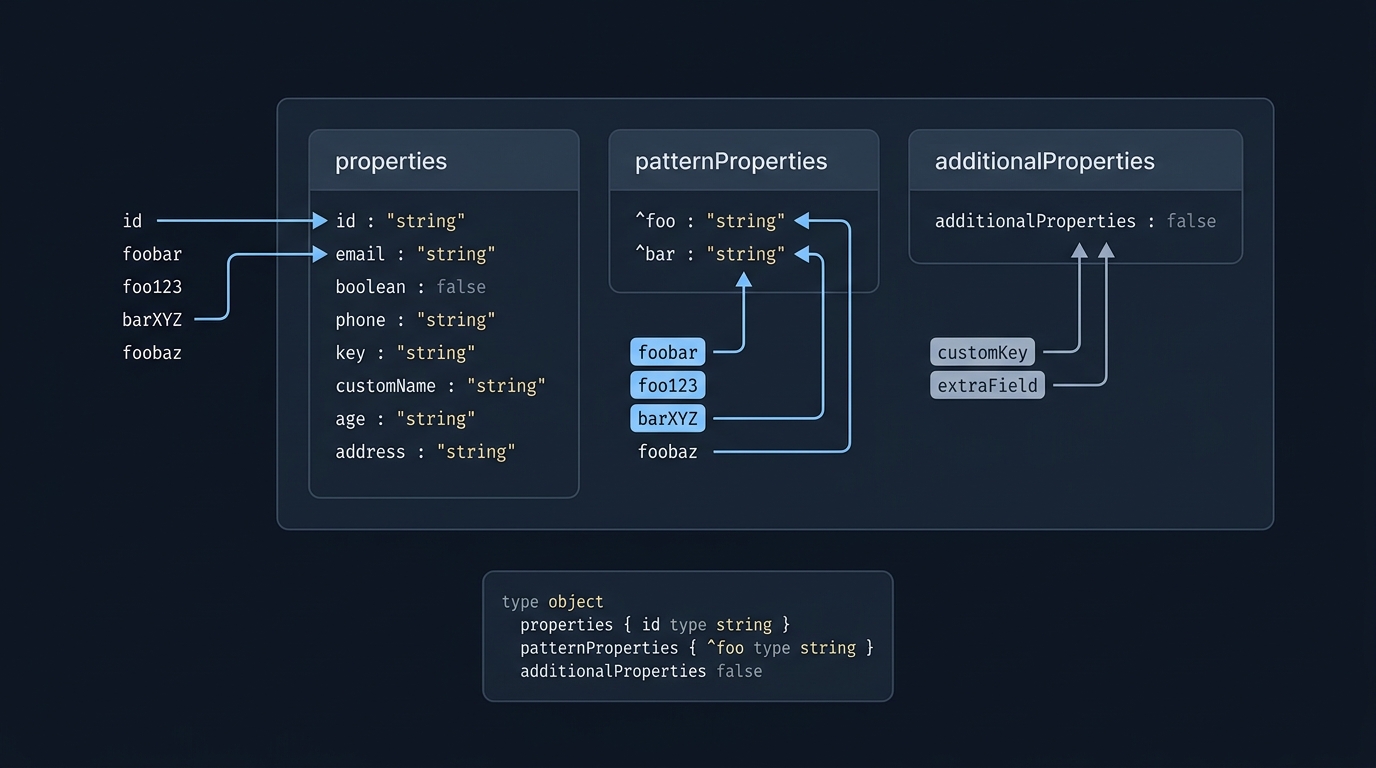
In JSON Schema, additionalProperties controls what happens to object properties whose names are not matched by properties or patternProperties: you can allow them, forbid them, or require that their values pass a subschema. By default they are allowed. See the official object reference for details JSON Schema - object.
What additionalProperties controls
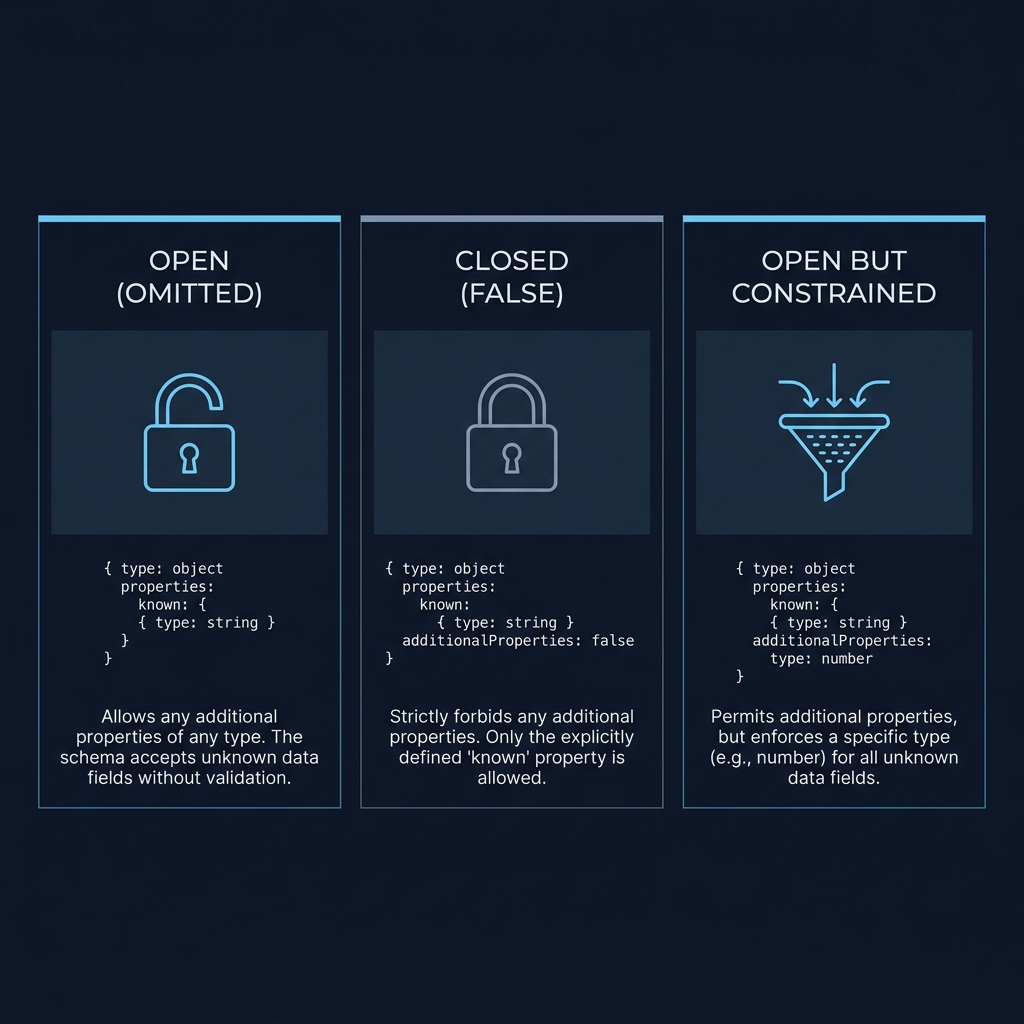
The keyword evaluates only the names left over after properties and patternProperties have matched. By default, any such additional properties are allowed; setting additionalProperties to false forbids them; setting it to a schema allows them only if their values validate against that schema JSON Schema - object.
Boolean vs schema forms
Boolean form:
{
  "type": "object",
  "properties": { "id": { "type": "string" } },
  "required": ["id"],
  "additionalProperties": false
}
Here, any key other than id is rejected JSON Schema - object.
Schema form:
{
  "type": "object",
  "properties": { "name": { "type": "string" } },
  "additionalProperties": { "type": "string" }
}
Unknown keys are allowed, but each such value must be a string Tour: Additional Properties additionalProperties (2020-12).
How it interacts with properties, patternProperties and required
Matching rules
If a name is declared in properties or matched by a regex in patternProperties, it is not considered “additional.” additionalProperties only sees names that match neither, and validates or forbids them accordingly JSON Schema - object.
Declaring vs requiring
Listing a key in properties does not make it required. Use required to enforce presence, and combine with additionalProperties for a closed set of keys when needed JSON Schema - object additionalProperties (2020-12).
{
  "type": "object",
  "properties": {
    "id": { "type": "string" },
    "name": { "type": "string" }
  },
  "required": ["id"],
  "additionalProperties": false
}
This accepts exactly id (required) and optionally name; any other key is rejected JSON Schema - object.
Compositions and when to use unevaluatedProperties
additionalProperties only recognizes properties declared in the same subschema as itself. In compositions like allOf, keys introduced in a sibling may still be treated as additional and get rejected unless you account for them. The official docs show this pitfall and a workaround that redeclares properties alongside additionalProperties JSON Schema - object.
{
  "allOf": [
    {
      "type": "object",
      "properties": { "street_address": {"type": "string"} },
      "additionalProperties": false
    },
    {
      "type": "object",
      "properties": { "type": {"enum": ["residential", "business"]} }
    }
  ]
}
In the first subschema, additionalProperties: false cannot "see" type declared in the second; type may be flagged as additional. From draft 2019-09 onward, unevaluatedProperties addresses this by restricting properties not validated by any sibling subschema JSON Schema - object.
{
  "$schema": "https://json-schema.org/draft/2020-12/schema",
  "type": "object",
  "allOf": [
    {
      "properties": {
        "street_address": {
          "type": "string"
        }
      }
    },
    {
      "properties": {
        "type": {
          "enum": [
            "residential",
            "business"
          ]
        }
      }
    }
  ],
  "unevaluatedProperties": false
}
Use unevaluatedProperties only with validators that implement draft 2019-09 or later.

Practical patterns and pitfalls
- Open by default: Without additionalProperties, extra keys are allowed. Add constraints only when you need a closed or controlled extension model JSON Schema - object.
- Controlled maps: Omit properties and use additionalProperties: {"type": "string"} to describe a "map" where every value shares a shape, regardless of key name additionalProperties (2020-12).
- Regex care: patternProperties can be broad; prefer ^...$ anchoring so you don’t accidentally reroute keys you intended to treat as additional JSON Schema - object.
Decide and apply additionalProperties correctly
FAQ
Does additionalProperties block keys declared in properties?
No. Keys listed in properties or matched by patternProperties are not considered additional; only other keys are affected JSON Schema - object.
How do I allow any keys but constrain their values?
Set additionalProperties to a schema. For example, {"additionalProperties": {"type": "string"}} allows any key whose value is a string Tour: Additional Properties.
When should I use unevaluatedProperties?
Use it when combining schemas and you need closure across all branches. It’s available from draft 2019-09 onward; ensure your validator supports it JSON Schema - object.
Related reading on CheckMySchema: What JSON Schema is used for in practice and JSON Schema vs JSON-LD: what is the difference?
