Structured data explained
What is the difference between JSON and XML?
A clear, source-backed comparison focused on data types: how JSON and XML represent values, where each fits, and how to convert safely.
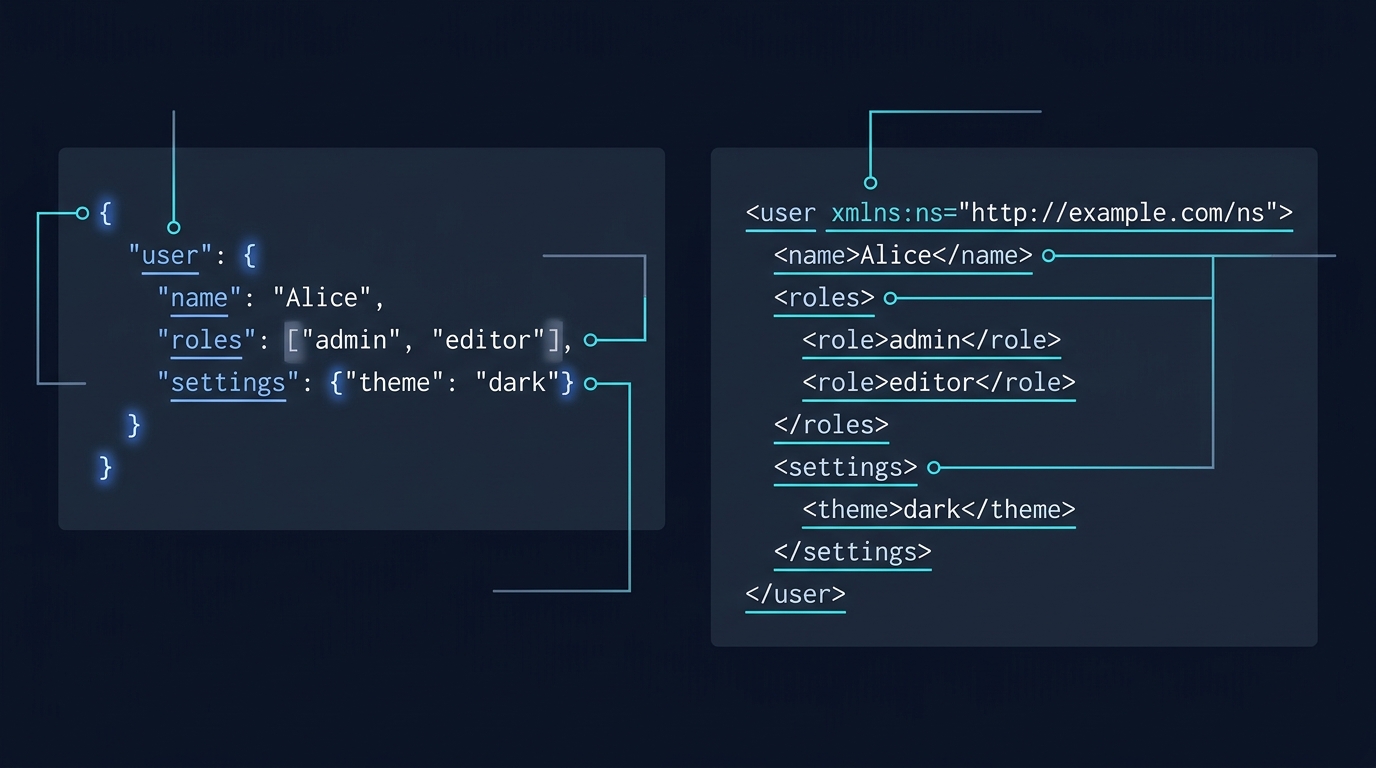
Short answer: JSON is a data-interchange format with defined data types (string, number, boolean, null, object, array). XML is a markup language that represents information with elements and attributes; content is text unless an application or schema assigns types. Choose JSON when you need native numbers, booleans and arrays in compact payloads; choose XML when you need document features like mixed content, comments or processing instructions, or when an existing XML document contract is required (RFC 8259: JSON; W3C XML 1.0).
JSON vs XML at the data-type level
JSON: explicit types and structures
- Types: string, number, boolean, null, object and array. Objects are collections of name/value pairs; arrays are ordered lists (RFC 8259).
- Numbers are base‑10 and exclude non-numeric literals like NaN and Infinity (RFC 8259).
- On the wire between unrelated systems, JSON text must be UTF‑8 (RFC 8259).
- Comments are not part of the JSON grammar. Use a strict JSON mode for interoperable data; some parser implementations also offer non-standard extensions (RFC 8259).
XML: elements, attributes and text
- XML documents consist of elements (with start/end tags), attributes and character data. The core model is text; any typing beyond text is imposed by applications or schemas/DTDs (W3C XML 1.0).
- XML supports comments and CDATA sections (W3C XML 1.0).
- Mixed content (text interleaved with child elements) is a first-class document feature (W3C XML 1.0).
- Constraints can be expressed via a Document Type Definition (DTD); applications may also use separate XML schema languages. A DTD is not mandatory for every well-formed XML document (W3C XML 1.0).
- Names may include a colon; the separate Namespaces in XML recommendation assigns meaning to colons in names (noted within XML 1.0).

Side-by-side example
Same data as JSON (explicit types) and as XML (text plus structure):
Valid JSON
{
  "reading": {
    "id": 42,
    "title": "Sensor reading",
    "values": [12.3, 14.7],
    "active": true
  }
}
Equivalent XML (values are text, not typed by the format)
<reading id="42">
  <title>Sensor reading</title>
  <values>
    <value>12.3</value>
    <value>14.7</value>
  </values>
  <active>true</active>
</reading>
When to choose which
- Prefer JSON when you need native numbers/booleans/arrays, concise payloads, and an object/array model that maps directly to code (RFC 8259).
- Prefer XML for document-centric content that relies on mixed content, comments, processing instructions, or when a DTD-governed structure is part of the contract (W3C XML 1.0).
Conversion tips and common pitfalls
- Attributes vs elements: decide how to map XML attributes to JSON properties. Both carry text; neither implies numeric/boolean typing in XML (W3C XML 1.0).
- Mixed content: pure JSON has no concept of text nodes interleaved with children. If your XML uses mixed content, model it explicitly (for example, an array mixing strings and objects) or keep XML (W3C XML 1.0).
- Numbers and booleans: XML element and attribute values are characters. Decide if strings like "0032" should remain strings or be converted to numbers (risking loss of leading zeros) (W3C XML 1.0).
- Encoding: ensure outbound JSON is UTF‑8 when exchanging with unrelated systems (RFC 8259).
Plan a safe JSON ↔ XML mapping
Worked mapping example
JSON input
{
  "user": {
    "id": 7,
    "name": "Lee",
    "roles": ["editor", "contributor"],
    "active": true
  }
}
One XML representation
<user id="7">
  <name>Lee</name>
  <roles>
    <role>editor</role>
    <role>contributor</role>
  </roles>
  <active>true</active>
</user>
Notes: the JSON array became repeated <role> elements; the boolean true is text in XML; the numeric ID moved into an attribute. If you need to preserve data types through XML, you must impose your own conventions or use a schema and application logic (W3C XML 1.0).
Related reading on CheckMySchema
FAQ
Does JSON support comments?
No. Comments are not part of the JSON grammar; generators should emit standard JSON. A parser can offer extensions, so ensure strict mode is being used when checking conformance (RFC 8259).
Can XML represent arrays?
XML has no native array type; you represent lists by repeating elements (for example, multiple <role> elements). Element and attribute values are character data (W3C XML 1.0).

A useful next step
For API work, the payload format is only one part of the request contract. What is a payload in a REST API?.